
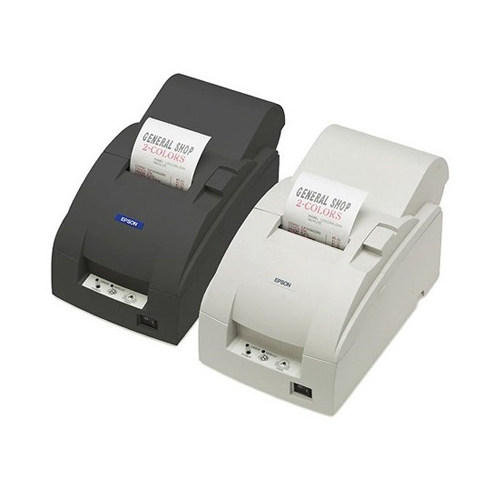
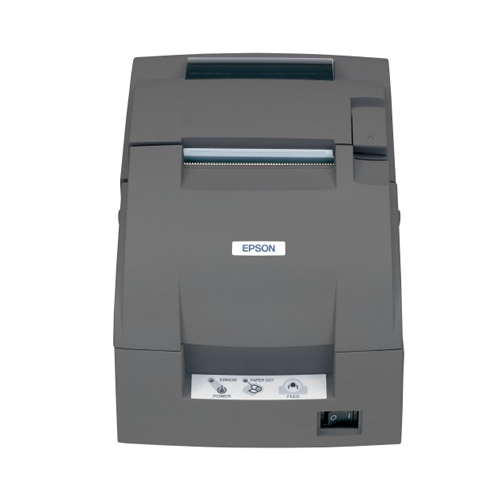
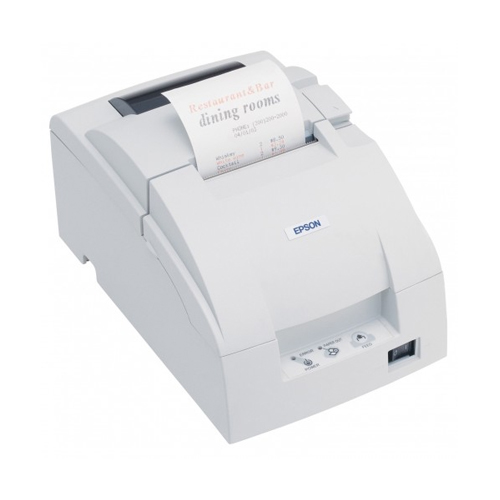
Epson TM U220B USB POS Printer
-8 %


Contact for Bulk Quantity: 01771833944
অর্ডার করার পূর্বে কাস্টমার কেয়ার থেকে পন্যের স্টক ও ডেলিভারি সম্পর্কে জেনে নেয়ার অনুরোধ করা যাচ্ছে। প্রযুক্তি পণ্যের মূল্য অস্থিতিশীল হওয়ায় কারণে যেকোন মুহূর্তে যেকোন প্রযুক্তি পণ্যের মূল্য পরিবর্তন হতে পারে।
Quick Compare
| Product Details | ||||
| Product | Epson TM U220B USB POS Printer | Brother DCP-L2540DW Multi-Function Wireless Printer | Canon imageCLASS MF3010 All In One Laser Printer | Canon Pixma G4010 All in One Wireless Ink Tank Printer |
| Image |  |
 |
||
| Price | |
|
|
|
| Model | TM-U220B | Model | MF3010 | Model |
| Brand | Epson | Brother | Canon | Canon |
| Availability | In Stock | In Stock | In Stock | In Stock |
| Rating | Based on 0 reviews. |
Based on 0 reviews. |
Based on 1 reviews. |
Based on 0 reviews. |
| Summary | Epson TM U220B USB POS PrinterThe Epson TM U220B USB POS Printer is a reliable and efficient printing solution designed specifically for Point of Sale (POS) systems. With its fast print speed and durable construction, this printer is suitable for various retail and hospitality environments where quick and accurate receipt printing is essential.Featuring a print speed of 4.70 lines per second (lps) at 40 columns and 16.00 characters per inch (cpi), the TM U220B ensures swift transaction processing, reducing customer waiting times. It utilizes a 9-pin serial impact dot matrix print method, which provides clear and legible prints, making it ideal for receipts, tickets, and other important documentation.The printer supports multiple interfaces, including RS-232, drawer kick-out, and bidirectional parallel, ensuring seamless connectivity with a variety of POS systems. This versatility allows for easy integration into existing setups without compatibility issues.With a compact and space-saving design, the TM U220B is designed to fit neatly into any workstation. It comes in two color options: Epson Dark Grey and Epson Cool White, allowing you to choose the one that best matches your aesthetic preferences. The dimensions of the printer are 160 x 248 x 139 mm (Width x Depth x Height), and it weighs 2.5 kg, making it easy to place and transport as needed.The TM U220B supports various character sizes and sets, including 95 alphanumeric characters, 48 international characters, and 128 x 12 graphic characters. It offers two characters per inch options: 13.3 cpi and 16 cpi, allowing for versatile printing styles to meet different requirements.When it comes to paper handling, the printer accommodates different sizes, including 76 mm, 69.50 mm, and 57.50 mm widths, with a maximum paper roll diameter of 83.00 mm. The column capacity for receipts ranges from 33 to 40, and it can produce one copy plus an original for efficient record-keeping.For reliable performance, the TM U220B operates using the PS-180 power supply and requires a 24 V operating voltage. It also comes with a 1-year warranty, providing peace of mind and support in case of any issues.To keep the printer running smoothly, it utilizes the EPSON ERC38B ribbon cartridge in black for standard printing and the EPSON ERC38BR ribbon cartridge in black and red for highlighting important information or adding emphasis to specific details.In summary, the Epson TM U220B USB POS Printer delivers fast and accurate receipt printing, making it an essential component of any retail or hospitality environment. With its compact design, multiple interface options, and reliable performance, this printer ensures efficient transaction processing and seamless integration with POS systems.FeaturesHigh Print Speed: The printer offers a fast print speed of 4.70 lines per second (lps) at 40 columns and 16.00 characters per inch (cpi), ensuring quick and efficient receipt printing.Reliable Print Technology: The TM U220B utilizes a 9-pin serial impact dot matrix print method, which provides clear and legible prints for receipts and other documents. The serial impact dot matrix technology ensures durability and longevity.Versatile Interfaces: The printer supports multiple interfaces, including RS-232, drawer kick-out, and bidirectional parallel, allowing for seamless connectivity with various POS systems and peripherals.Flexible Character Sizes and Sets: The TM U220B supports different character sizes, including 1.2 mm (W) x 3.1 mm (H) and 1.6 mm (W) x 3.1 mm (H). It also offers a wide character set, including 95 alphanumeric characters, 48 international characters, and 128 x 12 graphic characters.Adjustable Characters per Inch: The printer provides options for characters per inch, with 13.3 cpi and 16 cpi settings, allowing you to customize the print density according to your preferences and requirements.Versatile Paper Handling: The TM U220B accommodates various paper sizes, including 76.00 ± 0.50 (W) mm x dia 83.00 mm, 69.50 ± 0.50 (W) mm x dia 83.00 mm, and 57.50 ± 0.50 (W) mm x dia 83.00 mm. It supports receipt-type paper and has a paper roll diameter of 83.00 mm.Efficient Input Capacity: The column capacity for receipt printing is 33 or 40 columns, depending on the paper width (76 mm). The TM U220B also offers copy capability for receipts, allowing you to produce one copy plus an original.Compact and Stylish Design: Available in Epson Dark Grey and Epson Cool White color options, the TM U220B features a compact design with dimensions of 160 x 248 x 139 mm (Width x Depth x Height), making it suitable for various point-of-sale setups. It weighs 2.5 kg, making it easy to move and install.Reliable Power Supply: The printer operates using the PS-180 power supply and requires a 24 V operating voltage, ensuring consistent and reliable performance.Warranty and Supplies: The TM U220B comes with a 1-year warranty, providing peace of mind and support. It uses EPSON ERC38B ribbon cartridges in black for standard printing and EPSON ERC38BR ribbon cartridges in black and red for highlighting important information... | Brother DCP-L2540DW Multi-Function Wireless Printer The first print-out time is 8.5 sec 16 characters x 2 lines LCD display 32 MB memory capacity 30-bit input color processing 24-bit output color processing Output capacity is 100 sheets Duplex printing The monthly print volume is 250 to 2000 pages The maximum monthly duty cycle is 10000 printed pages 25% to 400% zoom range The noise level is 50 dB The power source is 220 to 240V at 50 / 60Hz .. | Canon imageCLASS MF3010 All In One Laser PrinterCanon imageCLASS MF3010 All In One Laser Printer features a new operation panel design that integrates seamlessly with the body of the device. The stylish and user-friendly layout enables easy operation of the device. The imageCLASS MF3010 uses the all-in-one Toner Cartridge 325. The Canon all-in-one toner cartridge design integrates the photosensitive drum, cleaning unit, and toner reservoir in one compact package, saving costs and making toner replacements easy.Canon imageCLASS MF30 Laser Printer FeaturesPrint, Scan, CopyPrint Speed (A4): Up to 18 ppmFirst Print Out Time (A4): Approx. 7.8 secRecommended Monthly Print Volume: 250 - 1,000 pagesThe ideal print, scan, copy solution for the home officePaper Source: 150-sheet cassettePaper Weight: 60 to 163g/m2 (cassette)Paper Output: 100 sheets (face down)Zoom: 50 - 200% in 10% increments.. | Canon Pixma G4010 All in One Wireless Ink Tank Printer Canon PIXMA G4010 feature Canon Genuine Refillable Ink Supply System, capable of volume printing up to 6,000 pages and 7,000 pages from a single set of black and color (cyan/magenta/yellow) ink bottles respectively. This drastically brings color document print cost down. The front facing integrated transparent ink tank design makes it easy to check the remaining ink levels. Topping up is now a quick and mess-free task simply by opening the ink bottle and pouring ink into the ink tank. The utilization of hybrid ink system and FINE print head guarantees a stable and reliable high quality printing performance, realizing prints with crisp, sharp black text and vibrant colors to ensure excellence for both document and photo printing. A wide array of mobile printing technologies brings extra convenience to users to print directly from smart phones and tablets, which are now handy tools for checking emails, photos, documents or researching on the internet. It allows users to scan directly to iOS or Android mobile devices via a Wi-Fi wireless network, and supports direct printing of photos and documents from mobile devices as well as remote cloud printing all without the need of a computer. The new printers feature a built-in Wi-Fi 802.11b/g/n wireless network for network print/scan. Upon simple network setup in just a few easy steps, high quality and high-speed printing can be shared among multiple computers. Users can also enjoy the flexibility of working from laptop and being accessible to the printer function with the wireless network. The new printers feature a built-in Wi-Fi 802.11b/g/n wireless network for network print/scan. Upon simple network setup in just a few easy steps, high quality and high-speed printing can be shared among multiple computers. Users can also enjoy the flexibility of working from laptop and being accessible to the printer function with the wireless network... |
Recently Viewed

Most Viewed
